
IMS One Roster
K12NET provides a certified implementation of the IMS OneRoster 1.1 specification, an open standard published by 1EdTech (formerly IMS Global) for securely and reliably exchanging roster information between K12NET and your application. By conforming to OneRoster, K12NET enables Partners to consume the same well-known REST endpoints — organizations, schools, academic sessions, classes, courses, enrollments, users (students, teachers), and demographics — without having to learn a proprietary data model. This guide explains how Organizations using K12NET can enable the OneRoster 1.1 integration and how Partners can connect to it.
Reference Implementation & Specification
K12NET's OneRoster service is validated against the official 1EdTech OneRoster Reference Implementation. You can find detailed information about the specification, the data model, and conformance from the following resources:
- 1EdTech OneRoster Reference Implementation: https://or-ri.imsglobal.org/ — the official reference service used to verify OneRoster conformance.
- OneRoster API Documentation: https://documenter.getpostman.com/view/482679/Szf81o4X?version=latest — detailed, endpoint-by-endpoint documentation of the OneRoster 1.1 REST API.
Postman Collection & Environment
To help you get started quickly, we provide a ready-to-use Postman collection and a matching environment. The collection mirrors the structure of the 1EdTech reference implementation ("IMS One Roster Ref Impl."), with all OneRoster 1.1 REST endpoints pre-configured and authorization handled at the folder level.
-
Download the Collection and Environment: Download the IMS OneRoster Integration collection and the OR RI Prod environment from our developers' portal.
-
Import into Postman: Open Postman and click the "Import" button at the top left of the window. Select the two downloaded files. Both the collection and the environment will be added to your Postman workspace.
Configure the Environment Variables
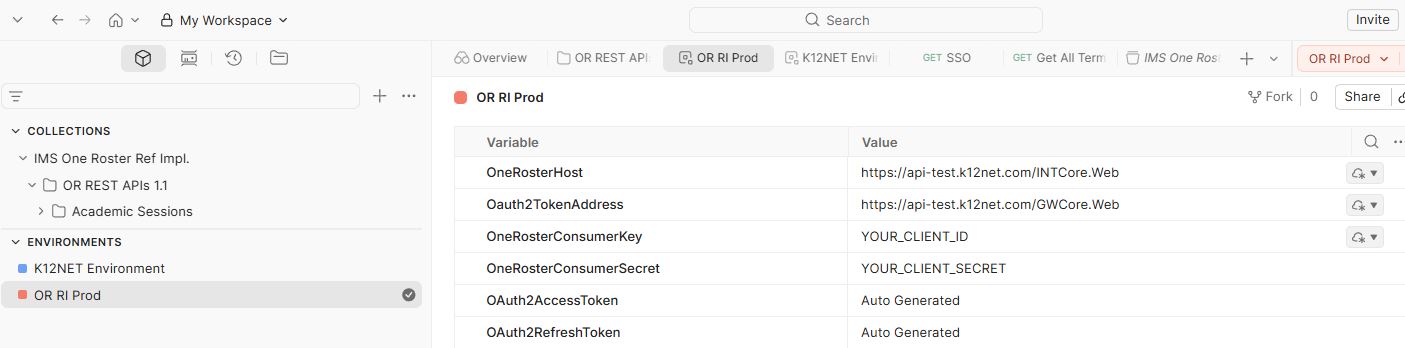
After importing, select the OR RI Prod environment from the environment selector (top right) and make it the active environment. This environment defines the variables that every request in the collection relies on. You only need to fill in your own credentials; the OAuth tokens are populated automatically.
-
OneRosterHost— the base URL of the K12NET OneRoster (Rostering) service, e.g.https://api-test.k12net.com/INTCore.Web. Use this host for testing; switch to the production host once you go live. -
Oauth2TokenAddress— the base URL of the K12NET authorization server that issues access tokens, e.g.https://api-test.k12net.com/GWCore.Web. -
OneRosterConsumerKey— yourclient_id. Replace the placeholderYOUR_CLIENT_IDwith the Consumer Key provisioned for the Organization. -
OneRosterConsumerSecret— yourclient_secret. Replace the placeholderYOUR_CLIENT_SECRETwith the Consumer Secret provisioned for the Organization. -
OAuth2AccessToken— leave this as Auto Generated. Postman fills it in automatically when you request a new token. -
OAuth2RefreshToken— leave this as Auto Generated as well.
Keep your OneRosterConsumerKey and OneRosterConsumerSecret confidential — treat them as you would any password. They authenticate your application as a trusted Partner for the Organization's data.
Authorization (OAuth 2.0 Client Credentials)
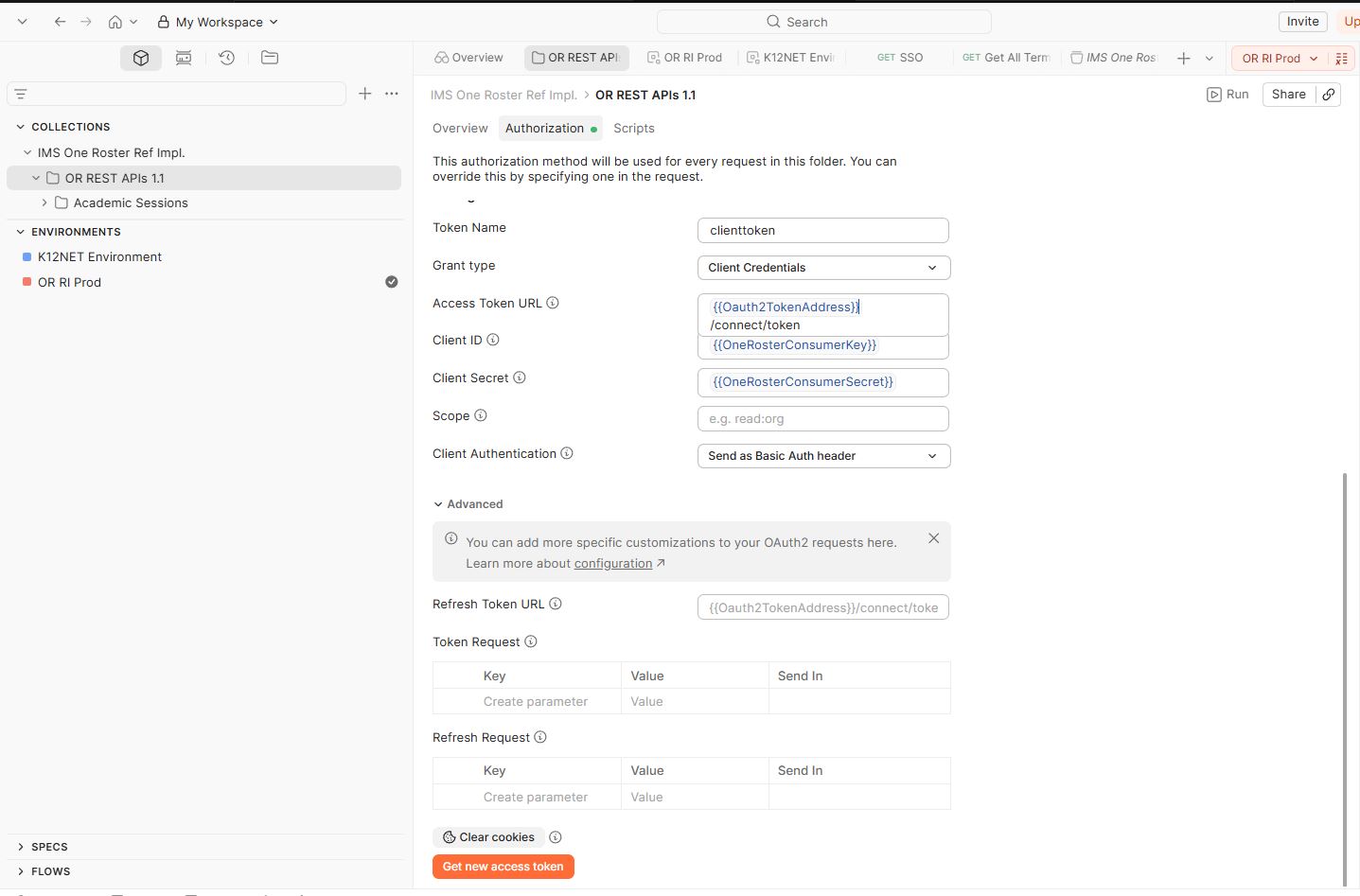
Authorization is configured once at the OR REST APIs 1.1 folder level and is inherited by every request inside the folder, so you do not need to authenticate each request individually. The authorization is set up as follows:
- Token Name:
clienttoken - Grant Type:
Client Credentials - Access Token URL:
{{Oauth2TokenAddress}}/connect/token - Client ID:
{{OneRosterConsumerKey}} - Client Secret:
{{OneRosterConsumerSecret}} - Client Authentication:
Send as Basic Auth header
Because these fields reference the environment variables you configured above, you do not have to edit the authorization settings directly — simply keep the OR RI Prod environment active. To obtain a token, open the OR REST APIs 1.1 folder, go to the Authorization tab, and click "Get new access token". Postman will exchange your Consumer Key and Secret for an access token, store it in OAuth2AccessToken, and use it as a Bearer token on subsequent requests.
Acquiring an Access Token Manually
If you are integrating outside of Postman, request an access token from the token endpoint using the Client Credentials grant. Authenticate by sending your Consumer Key and Secret as an HTTP Basic Auth header:
curl -X POST https://api-test.k12net.com/GWCore.Web/connect/token \
-u "YOUR_CLIENT_ID:YOUR_CLIENT_SECRET" \
-d "grant_type=client_credentials" \
-H "Content-Type: application/x-www-form-urlencoded"
Replace YOUR_CLIENT_ID and YOUR_CLIENT_SECRET with your Consumer Key and Consumer Secret. The response contains an access_token that you must include in the Authorization header of every OneRoster request.
Calling the OneRoster Endpoints
All OneRoster 1.1 REST endpoints are served under the OneRosterHost base URL, following the /ims/oneroster/v1p1/ path defined by the specification. For example, to retrieve all academic sessions for the Organization:
curl -X GET https://api-test.k12net.com/INTCore.Web/ims/oneroster/v1p1/academicSessions \
-H "Authorization: Bearer YOUR_ACCESS_TOKEN"
Replace YOUR_ACCESS_TOKEN with the token obtained in the previous step. The imported collection contains pre-built requests for the full set of OneRoster resources — organizations, schools, academic sessions, courses, classes, enrollments, users, students, teachers, and demographics — so you can explore each endpoint with a single click.
As with all K12NET APIs, the JSON fields returned by these endpoints are controlled by the respective Organization. Certain fields may be present for one Organization and absent for another, depending on each institution's privacy and data-governance policies. Design your application to handle the presence or absence of optional fields gracefully.
For the complete data model, query parameters, filtering and sorting rules, and response schemas, refer to the OneRoster API documentation and the 1EdTech OneRoster Reference Implementation. Should you encounter any issues or have questions, feel free to reach out to our support team for assistance.